As the MT 48 has 4 stereo sets of analog outputs, plus ADAT/SPDIF - you have the capability to set up four different mixes (one per output pair.)
By default, Main Monitors are Outs 1-2 (Mix 1)
Line Outputs are Outs 3-4 (Mix 2)
Phones 1 are Outs 5-6 (Mix 3)
Phones 2 are Outs 7-8 (Mix 4)
These can be toggled using these four buttons on the top of your interface:

The rotary dial will control the overall output level of the selected output.
You can therefore set up different playback levels coming in from the DAW (Software Playback) and any connected Hardware input levels, four times - once to Mix 1, 2, 3, and 4.
You can therefore set up different playback levels coming in from the DAW (Software Playback) and any connected Hardware input levels, four times - once to Mix 1, 2, 3, and 4.
This can come in handy in a recording scenario where the recording engineer listening through the main monitors wants to monitor the main mix (Mix 1) in the control room separately from a musician who is tracking with a set of headphones (Mixes 3, 4.)
Mix 2 might be sent out to separate monitors with its own mix, or a headphone amplifier for other musicians.
BUS Routing:
To set up 4 separate mixes, Click MENU > Bus Routing.
Verify Mix 1, Mix 2, Mix 3, and Mix 4 cascade as follows - indicating each are sent to a pair of separate hardware outputs.
You can also route any expandable outputs (ADAT or Peering enabled) by scrolling down in this window and assigning to them to any of the 4 mixes.
Software Playback to MT 48 Mixer
DAW1, DAW2, DAW3 and DAW4 are stereo channels from your computer software to the MT 48.
Per default, DAW1 and DAW2 are activated. These channels appear as stereo channel strips in your MT 48 Mixer. This allows you to create monitoring mixes with the live inputs balanced against the DAW signal being played back.
Per default, DAW1 and DAW2 are activated. These channels appear as stereo channel strips in your MT 48 Mixer. This allows you to create monitoring mixes with the live inputs balanced against the DAW signal being played back.
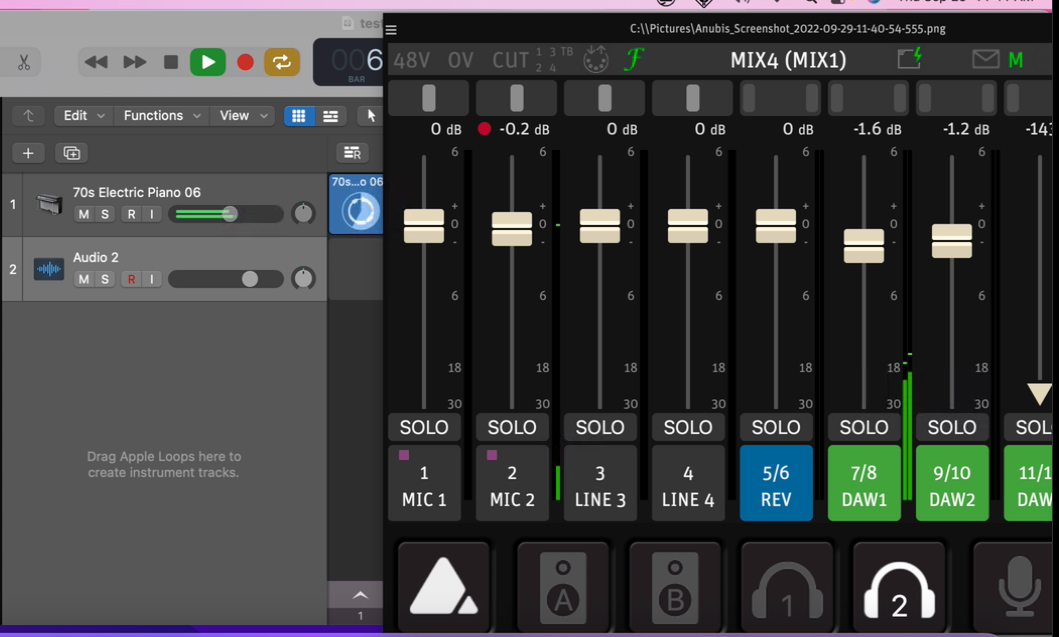
You can enable these by clicking the Menu button > SETTINGS > USB IO > Software Playback and enabling as you see fit.
DAW 1 is routed from the MT48's main outputs 1-2,
DAW 2 follows physical output 3-4,
DAW 3 follows Headphone 1 (outputs 5-6), and
DAW 4 follows Headphone 2 (outputs 7-8.)
When you route a recorded track in your DAW to a specific output, it will play back on the respective DAW channel.
Having more than one DAW channel in your MT 48 mixer is handy for several applications:
• Putting a click track on a separate DAW channel while tracking
• Creating stems on up to four DAW channels by instrument grouping for the artist to create their own mix from (i.e. melodic instruments/vocals/bass/drums)
• Putting a click track on a separate DAW channel while tracking
• Creating stems on up to four DAW channels by instrument grouping for the artist to create their own mix from (i.e. melodic instruments/vocals/bass/drums)
Alternatively, you can also set any other mix to follow Mix 1.
Simply Go to MENU > SETTINGS > MONITORING and scroll down to the bottom of the page, where you can enable as warranted:
Mix 2 follows Mix 1
Mix 3 follows Mix 1
Mix 4 follows Mix 1
Mix 2 follows Mix 1
Mix 3 follows Mix 1
Mix 4 follows Mix 1
MIX 1-2 in A/B Mode:
If implementing two sets of monitors, enable the Mix 1-2 in A/B Mode option, along with Mix 2 follows Mix 1.
This keeps the level consistent amongs Mixes 1 and 2, in order to critically compare differences in a mix.